Compare commits
| Author | SHA1 | Date | |
|---|---|---|---|
 Ari Sosnovsky |
070dc7c871 | ||
|
Ari Sosnovsky
|
3d70f04e60 | ||
 ari |
cf29d9d61c | ||
|
ari
|
2245fd556b | ||
|
ari
|
f50f22190e | ||
|
ari
|
b342088b96 | ||
|
ari
|
c0c0d3181c | ||
|
ari
|
cf013cc342 | ||
|
Ari Sosnovsky
|
23b869d43e | ||
|
Ari Sosnovsky
|
e333e80ea3 | ||
|
Ari Sosnovsky
|
996e23038f |
No files matched your search
+4
-2
@@ -1,3 +1,5 @@
|
||||
# Changelog -- [](https://badge.fury.io/gh/asosnovsky%2FShortumation)
|
||||
# Changelog -- v0.1.6
|
||||
|
||||
- Updated Api Routing
|
||||
- Improved mobile mode
|
||||
- Fixed up arrow styles due to typos
|
||||
- Added selection color
|
||||
@@ -1,6 +1,11 @@
|
||||
# Shortumation [](https://badge.fury.io/gh/asosnovsky%2FShortumation)
|
||||
# Shortumation
|
||||
|
||||
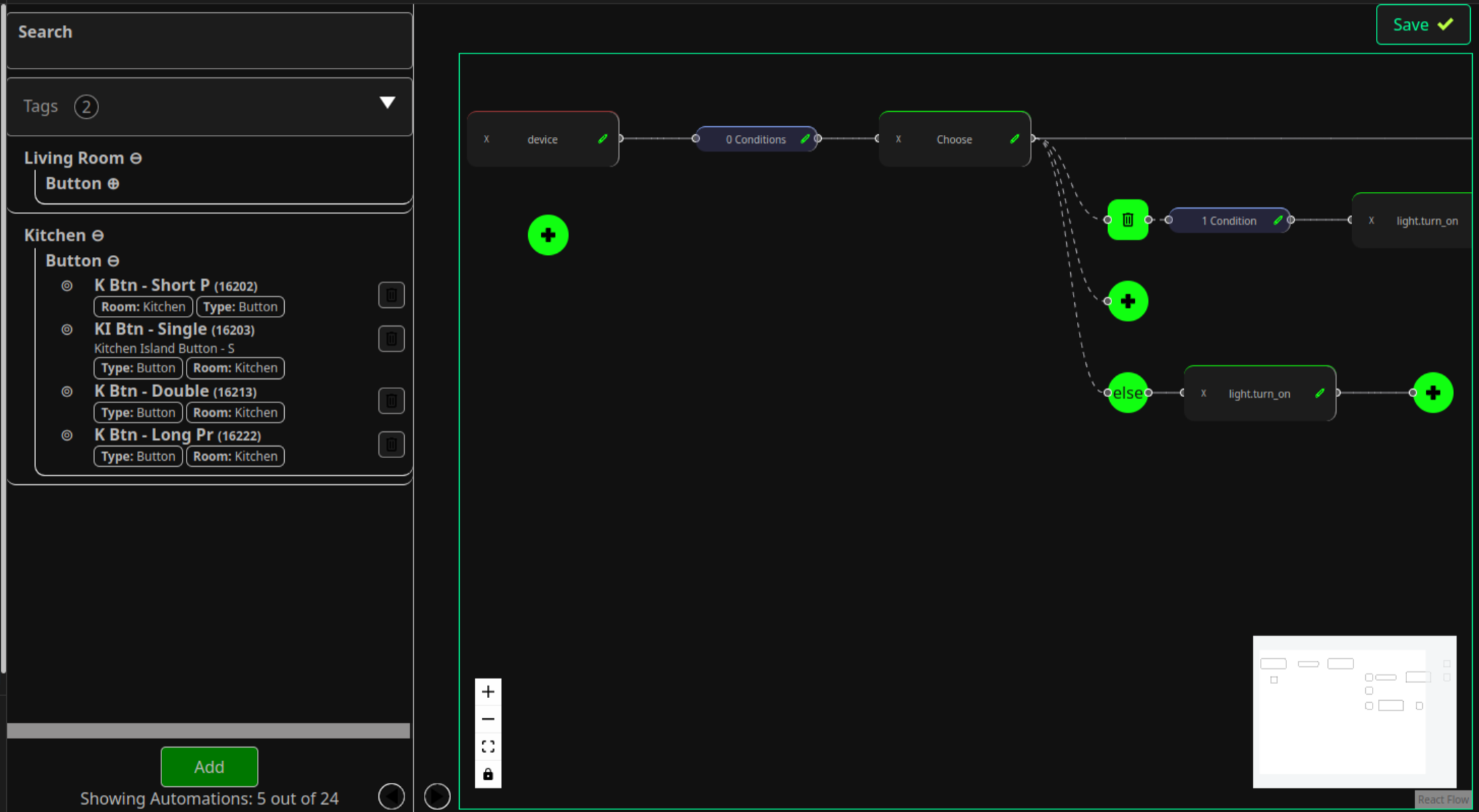
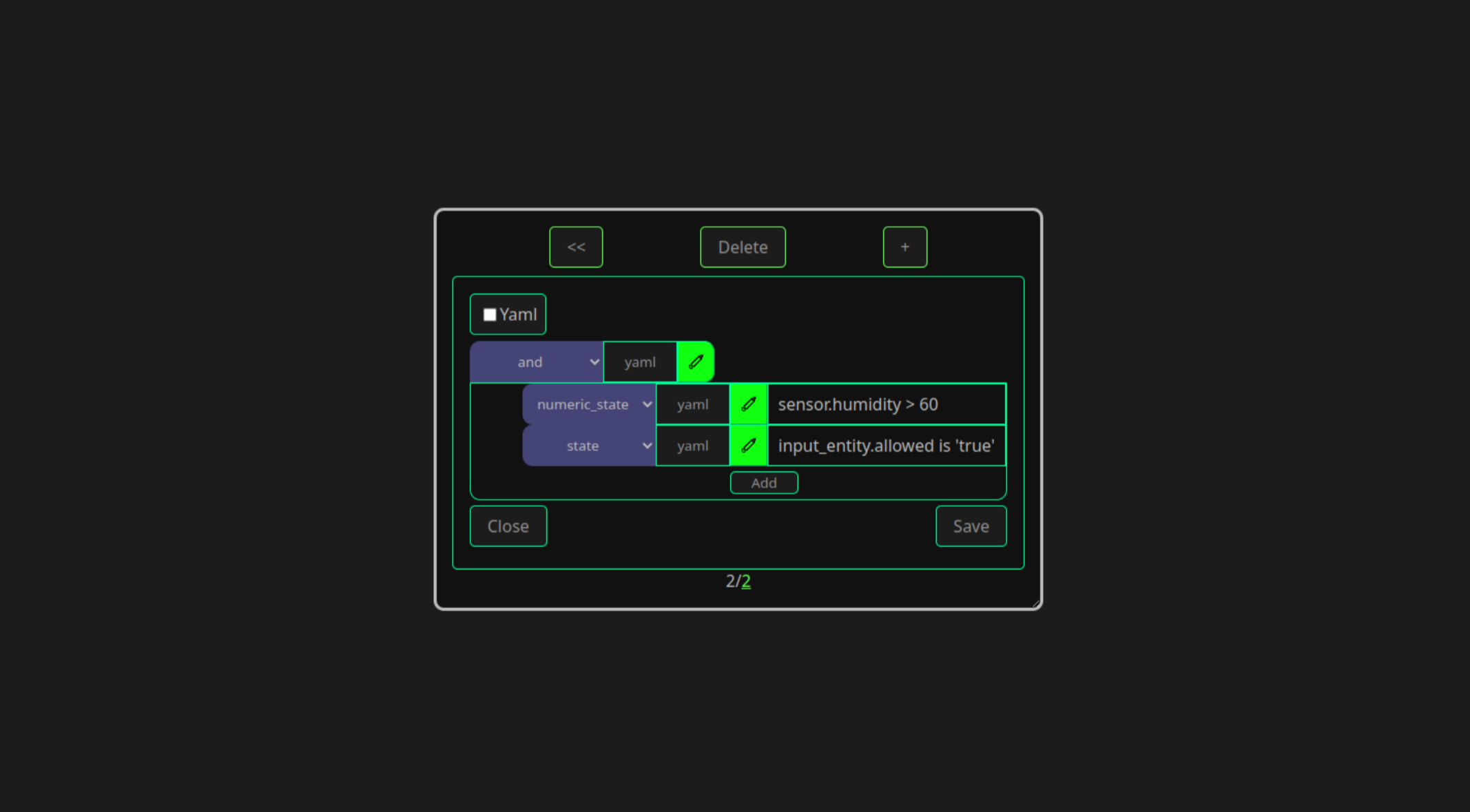
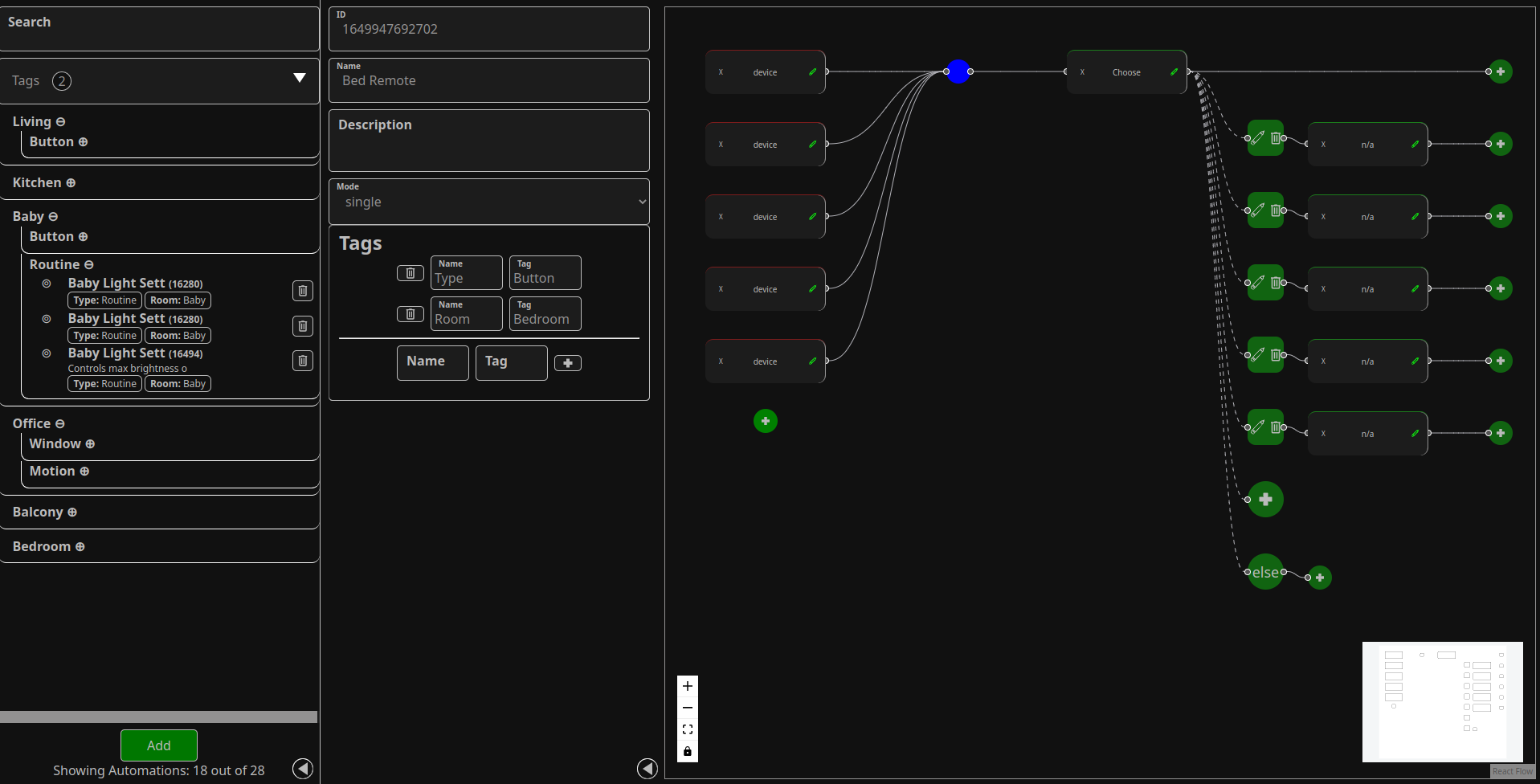
A better way to write automations in home-assistant without having to install and run a seperate automation engine!
|
||||
|
||||
|
||||
|
||||
|
||||
|
||||
|
||||
|
||||
A [home-assistent addon](https://www.home-assistant.io/addons/) for a better UI for managing your automations & scripts. We provide a way to visualize and develop your automation using a visual-programming language that draws inspirations from [Node-Red](https://nodered.org/).
|
||||
|
||||
@@ -19,3 +24,16 @@ A [home-assistent addon](https://www.home-assistant.io/addons/) for a better UI
|
||||
See roadmap in [Version 1 Github Project](https://github.com/asosnovsky/Shortumation/projects/1).
|
||||
|
||||
|
||||
## FAQ
|
||||
|
||||
**How is this different from Node-Red?**
|
||||
|
||||
> Node-Red is both an execution engine and an automation editor, which means that in order for you automations to run you have to have an additional component running and executing the automations. Shortumations simply provides a different editor and manager for writing Homeassistant automations, while relying on Homeassistant to execute the automations (this uses the `automations.yaml` file as the backend database)
|
||||
|
||||
**Which HA Installation does this support?**
|
||||
|
||||
> Currently this is only tested on HA OS. However, you should be able to get it working supervised installations as well (as they support addons). If you want to make it work for Container or Core, you will need to do some additional leg-work and I welcome a PR to get this working (it should be just a matter of mounting the `/config` path to the container running the images in this repo).
|
||||
|
||||
**Which version of HA does this require?**
|
||||
|
||||
> Since I am working on this project on my own, I can only test it against my own HA installations at home, and I tend to keep things as up to date as possible. The lowest version of HA this was tested on is `core-2022.5.4`
|
||||
+1
-1
@@ -1,5 +1,5 @@
|
||||
name: Shortumation
|
||||
version: 0.1.4
|
||||
version: 0.1.6
|
||||
slug: shortumation
|
||||
image: asosnovsky/shortumation-{arch}
|
||||
url: "https://github.com/asosnovsky/Shortumation"
|
||||
|
||||
@@ -5,7 +5,6 @@ import { useAPIService } from './core';
|
||||
import { useMockAPI } from "./mock";
|
||||
|
||||
const locationPrefixWeb = window.location.pathname.match(/(.+)\/web/i);
|
||||
console.log(process.env)
|
||||
|
||||
export const useConnectedApiService = () => useAPIService(
|
||||
makeAutomationAPI(makeRemoteAPI(
|
||||
|
||||
@@ -15,7 +15,7 @@
|
||||
}
|
||||
|
||||
.automation-editor--info-box.show {
|
||||
min-width: 25em;
|
||||
min-width: 20em;
|
||||
}
|
||||
|
||||
.automation-editor--info-box.hide {
|
||||
|
||||
@@ -10,10 +10,12 @@
|
||||
flex: 1;
|
||||
user-select: none;
|
||||
}
|
||||
.automation-list-box--body > * {
|
||||
|
||||
.automation-list-box--body>* {
|
||||
padding-top: 0.5em;
|
||||
padding-bottom: 0.5em;
|
||||
}
|
||||
|
||||
.automation-list-box--body--group {
|
||||
display: flex;
|
||||
flex-direction: column;
|
||||
@@ -21,33 +23,37 @@
|
||||
border-radius: 10px;
|
||||
padding-bottom: 0.5em;
|
||||
border-width: 1px;
|
||||
border-bottom-style: solid ;
|
||||
border-bottom-style: solid;
|
||||
border-color: white;
|
||||
}
|
||||
.automation-list-box--body--group > .automation-list-box--body--group {
|
||||
border-left-style: solid ;
|
||||
|
||||
.automation-list-box--body--group>.automation-list-box--body--group {
|
||||
border-left-style: solid;
|
||||
border-top-left-radius: 0;
|
||||
margin-left: 0.75em;
|
||||
padding-left: 0.5em;
|
||||
}
|
||||
|
||||
.automation-list-box--body--group > b {
|
||||
.automation-list-box--body--group>b {
|
||||
width: 100%;
|
||||
cursor: pointer;
|
||||
padding: 0.1em;
|
||||
}
|
||||
.automation-list-box--body--group > b:hover {
|
||||
|
||||
.automation-list-box--body--group>b:hover {
|
||||
background-color: var(--secondary-accent);
|
||||
color: var(--secondary);
|
||||
}
|
||||
|
||||
.automation-list-box--body--item:hover {
|
||||
.automation-list-box--body--item:hover, .automation-list-box--body--item.selected {
|
||||
background-color: var(--primary-accent);
|
||||
color: var(--primary);
|
||||
}
|
||||
.automation-list-box--body--item:hover > .automation-list-box--body--item--tags > span {
|
||||
|
||||
.automation-list-box--body--item:hover>.automation-list-box--body--item--tags>span {
|
||||
border-color: var(--primary);
|
||||
}
|
||||
|
||||
.automation-list-box--body--item {
|
||||
padding-left: 1em;
|
||||
cursor: pointer;
|
||||
@@ -57,25 +63,31 @@
|
||||
gap: 1em;
|
||||
flex-wrap: wrap;
|
||||
}
|
||||
|
||||
.automation-list-box--body--item::before {
|
||||
content: "⊚ ";
|
||||
}
|
||||
|
||||
.automation-list-box--body--item--title {
|
||||
display: flex;
|
||||
flex-direction: column;
|
||||
padding-left: 0.25em;
|
||||
flex: 1;
|
||||
}
|
||||
.automation-list-box--body--item--title > b {
|
||||
|
||||
.automation-list-box--body--item--title>b {
|
||||
font-size: 1em;
|
||||
}
|
||||
.automation-list-box--body--item--title > span, .automation-list-box--body--item--title > b > span {
|
||||
|
||||
.automation-list-box--body--item--title>span, .automation-list-box--body--item--title>b>span {
|
||||
font-size: 0.75em;
|
||||
}
|
||||
.automation-list-box--body--item > button {
|
||||
|
||||
.automation-list-box--body--item>button {
|
||||
padding: 0.25em !important;
|
||||
margin: 0.5em !important;
|
||||
}
|
||||
|
||||
.automation-list-box--body--item--tags {
|
||||
flex: 1;
|
||||
display: flex;
|
||||
@@ -87,13 +99,15 @@
|
||||
max-height: 100%;
|
||||
gap: 0.25em;
|
||||
}
|
||||
.automation-list-box--body--item--tags > span {
|
||||
|
||||
.automation-list-box--body--item--tags>span {
|
||||
border-color: var(--primary-accent);
|
||||
border-style: solid;
|
||||
border-width: 1px;
|
||||
border-radius: 0.5em;
|
||||
padding: 0.1em 0.5em;
|
||||
}
|
||||
|
||||
.automation-list-box--bottom {
|
||||
margin-top: 0.5em;
|
||||
margin-bottom: 0.5em;
|
||||
@@ -102,7 +116,8 @@
|
||||
justify-content: space-around;
|
||||
align-items: center;
|
||||
}
|
||||
.automation-list-box--bottom > button {
|
||||
|
||||
.automation-list-box--bottom>button {
|
||||
background-color: #070;
|
||||
color: var(--primary-accent);
|
||||
padding: 0.5em 2em;
|
||||
|
||||
@@ -13,10 +13,12 @@ export default {
|
||||
|
||||
|
||||
const Template: ComponentStory<typeof AutomationListBox> = args => {
|
||||
const [autos, setAutos] = useState(args.automations)
|
||||
console.log({ args })
|
||||
const [selected, setSelected] = useState(args.selected)
|
||||
return <div className="page">
|
||||
<AutomationListBox {...args} automations={autos} />
|
||||
<AutomationListBox {...args} automations={args.automations} selected={selected} onSelectAutomation={(i) => {
|
||||
setSelected(i)
|
||||
args.onSelectAutomation(i)
|
||||
}} />
|
||||
</div>
|
||||
}
|
||||
|
||||
|
||||
@@ -9,6 +9,7 @@ import { TrashIcon } from "components/Icons";
|
||||
|
||||
export type Props = {
|
||||
automations: AutomationData[];
|
||||
selected: number;
|
||||
onSelectAutomation: (i: number) => void;
|
||||
onRemove: (i: number) => void;
|
||||
onAdd: () => void;
|
||||
@@ -16,6 +17,7 @@ export type Props = {
|
||||
|
||||
export const AutomationListBox: FC<Props> = ({
|
||||
automations,
|
||||
selected,
|
||||
onSelectAutomation,
|
||||
onAdd,
|
||||
onRemove,
|
||||
@@ -23,9 +25,9 @@ export const AutomationListBox: FC<Props> = ({
|
||||
|
||||
const tags = getTagList(automations);
|
||||
const [searchText, setSearchText] = useState('');
|
||||
const [selected, setSelected] = useState<number[]>([]);
|
||||
const filteredAutomations = filterAutomations(automations, searchText, selected, tags);
|
||||
const groups = groupAutomations(filteredAutomations.map(([a, _]) => a), selected, tags);
|
||||
const [selectedTagIdx, setSelectedTagIdx] = useState<number[]>([]);
|
||||
const filteredAutomations = filterAutomations(automations, searchText, selectedTagIdx, tags);
|
||||
const groups = groupAutomations(filteredAutomations.map(([a, _]) => a), selectedTagIdx, tags);
|
||||
|
||||
return <div className="automation-list-box">
|
||||
<div className="automation-list-box--nav">
|
||||
@@ -36,14 +38,14 @@ export const AutomationListBox: FC<Props> = ({
|
||||
/>
|
||||
<InputMultiSelect
|
||||
label="Tags"
|
||||
selected={selected}
|
||||
onChange={setSelected}
|
||||
selected={selectedTagIdx}
|
||||
onChange={setSelectedTagIdx}
|
||||
options={tags}
|
||||
max={3}
|
||||
/>
|
||||
</div>
|
||||
<div className="automation-list-box--body">
|
||||
{convertGroupsToItems(groups, filteredAutomations, onSelectAutomation, onRemove)}
|
||||
{convertGroupsToItems(groups, filteredAutomations, onSelectAutomation, onRemove, selected)}
|
||||
</div>
|
||||
<div className="automation-list-box--bottom">
|
||||
<Button onClick={onAdd}>Add</Button>
|
||||
@@ -123,13 +125,14 @@ const convertGroupsToItems = (
|
||||
autos: Array<[AutomationData, number]>,
|
||||
onSelectAutomation: (i: number) => void,
|
||||
onRemove: (i: number) => void,
|
||||
selected: number,
|
||||
) => {
|
||||
if (Array.isArray(groups)) {
|
||||
return groups.map(i => {
|
||||
const [auto, autoIndex] = autos[i];
|
||||
return <div
|
||||
key={i}
|
||||
className="automation-list-box--body--item"
|
||||
className={["automation-list-box--body--item", selected === autoIndex ? 'selected' : ''].join(' ')}
|
||||
title={`Name = ${auto.metadata.alias}\nID = ${auto.metadata.id}\nDescription = ${auto.metadata.description}`}
|
||||
onClick={() => onSelectAutomation(autoIndex)}
|
||||
>
|
||||
@@ -158,6 +161,7 @@ const convertGroupsToItems = (
|
||||
autos={autos}
|
||||
onSelectAutomation={onSelectAutomation}
|
||||
onRemove={onRemove}
|
||||
selected={selected}
|
||||
/>
|
||||
})
|
||||
}
|
||||
@@ -170,16 +174,18 @@ const AutomationListBoxGroup: FC<{
|
||||
autos: Array<[AutomationData, number]>,
|
||||
onSelectAutomation: (i: number) => void,
|
||||
onRemove: (i: number) => void;
|
||||
selected: number,
|
||||
}> = ({
|
||||
groupName,
|
||||
groups,
|
||||
autos,
|
||||
onSelectAutomation,
|
||||
onRemove,
|
||||
selected,
|
||||
}) => {
|
||||
const [open, setOpen] = useState(false);
|
||||
return <div className="automation-list-box--body--group">
|
||||
<b onClick={() => setOpen(!open)}>{groupName} {!open ? "⊕" : "⊖"}</b>
|
||||
{open && convertGroupsToItems(groups, autos, onSelectAutomation, onRemove)}
|
||||
{open && convertGroupsToItems(groups, autos, onSelectAutomation, onRemove, selected)}
|
||||
</div>
|
||||
}
|
||||
@@ -9,7 +9,6 @@
|
||||
|
||||
.automation-list--list {
|
||||
flex: 1;
|
||||
min-width: 400px;
|
||||
max-width: 400px;
|
||||
position: relative;
|
||||
}
|
||||
|
||||
@@ -0,0 +1,70 @@
|
||||
/* none-hidden */
|
||||
.automation-list--root.mobile {
|
||||
flex-direction: column;
|
||||
}
|
||||
|
||||
.automation-list--root.mobile>.automation-list--list {
|
||||
max-width: 100vw;
|
||||
min-height: 100vh;
|
||||
}
|
||||
|
||||
.automation-list--root.mobile .automation-editor {
|
||||
flex-direction: column;
|
||||
}
|
||||
|
||||
.automation-list--root.mobile .automation-list--list-hide {
|
||||
transform: rotate(90deg);
|
||||
left: 1.25em;
|
||||
}
|
||||
|
||||
.automation-list--root.mobile .automation-editor--info-box {
|
||||
min-width: 100vw;
|
||||
min-height: calc(100vh - 5em);
|
||||
max-width: 100vw;
|
||||
max-height: calc(100vh - 5em);
|
||||
padding: 0;
|
||||
}
|
||||
|
||||
.automation-list--root.mobile .automation-editor--info-box-inner {
|
||||
margin-top: 2.5em;
|
||||
padding-left: 0.5em;
|
||||
padding-right: 0.5em;
|
||||
margin-bottom: 2em;
|
||||
}
|
||||
|
||||
.automation-list--root.mobile .automation-editor--info-box--icon {
|
||||
left: 1.25em;
|
||||
bottom: 0em;
|
||||
background-color: var(--primary);
|
||||
transform: rotate(90deg);
|
||||
}
|
||||
|
||||
|
||||
/* list hide */
|
||||
.automation-list--root.mobile .automation-list--list.hide {
|
||||
width: 100vw;
|
||||
min-height: 0;
|
||||
max-height: 0;
|
||||
}
|
||||
|
||||
.automation-list--root.mobile .automation-list--list.hide .automation-list--list-hide {
|
||||
transform: rotate(270deg);
|
||||
position: fixed;
|
||||
top: 0.75em;
|
||||
z-index: 20;
|
||||
}
|
||||
|
||||
/* info box hide */
|
||||
.automation-list--root.mobile .automation-editor--info-box.hide {
|
||||
width: 100vw;
|
||||
min-height: 0;
|
||||
max-height: 0;
|
||||
}
|
||||
|
||||
.automation-list--root.mobile .automation-editor--info-box.hide .automation-editor--info-box--icon {
|
||||
transform: rotate(270deg);
|
||||
position: fixed;
|
||||
top: 0.75em;
|
||||
background-color: var(--green-opaque);
|
||||
z-index: 30;
|
||||
}
|
||||
@@ -1,4 +1,5 @@
|
||||
import "./index.css";
|
||||
import "./index.mobile.css";
|
||||
import { AutomationEditor } from "components/AutomationEditor";
|
||||
import { FC, useState } from "react";
|
||||
import { AutomationData } from "types/automations";
|
||||
@@ -8,6 +9,7 @@ import { ButtonIcon } from "components/Icons/ButtonIcons";
|
||||
import { ApiService } from "apiService/core";
|
||||
import { AutomationListBox } from "./AutomationListBox";
|
||||
import { DAGAutomationFlowDims } from 'components/DAGFlow/types';
|
||||
import useWindowSize from "utils/useWindowSize";
|
||||
|
||||
|
||||
interface AutomationListParams {
|
||||
@@ -29,19 +31,25 @@ export const AutomationList: FC<AutomationListParams> = ({
|
||||
// state
|
||||
const [hideList, setHideList] = useState(false);
|
||||
const [current, setCurrent] = useState(0);
|
||||
const { isMobile } = useWindowSize();
|
||||
// alias
|
||||
const currentAuto = automations.length > 0 ? automations[current] : null;
|
||||
const automationListListCls = "automation-list--list" + (hideList ? " hide" : " show")
|
||||
// render
|
||||
return <div className="automation-list--root">
|
||||
<div className={automationListListCls}>
|
||||
return <div className={["automation-list--root", isMobile ? 'mobile' : ''].join(' ')}>
|
||||
<div className={["automation-list--list", hideList ? "hide" : "show"].join(' ')}>
|
||||
<AutomationListBox
|
||||
automations={automations}
|
||||
onAdd={() => {
|
||||
onAdd(defaultAutomation(`shortu-${automations.length}`));
|
||||
setCurrent(automations.length)
|
||||
}}
|
||||
onSelectAutomation={setCurrent}
|
||||
onSelectAutomation={i => {
|
||||
setCurrent(i);
|
||||
if (isMobile) {
|
||||
setHideList(true)
|
||||
}
|
||||
}}
|
||||
selected={current}
|
||||
onRemove={onRemove}
|
||||
/>
|
||||
<ButtonIcon
|
||||
|
||||
@@ -46,9 +46,7 @@ export const DAGNode: FC<{ data: DAGNodeProps }> = ({
|
||||
{label}
|
||||
</span>
|
||||
</div>
|
||||
<div className={classes.rightEdge} onClick={() => {
|
||||
console.log('editing me', label, onEditClick, onEditClick())
|
||||
}}>
|
||||
<div className={classes.rightEdge} onClick={onEditClick}>
|
||||
<button className={classes.buttonEdit}>
|
||||
<PencilIcon size={1.1} color={theme.green} />
|
||||
</button>
|
||||
|
||||
@@ -27,7 +27,6 @@ const Template: ComponentStory<typeof DAGAutomationFlow> = args => {
|
||||
{...args}
|
||||
{...state}
|
||||
onTriggerUpdate={trigger => {
|
||||
console.log({ trigger })
|
||||
setState({ ...state, trigger })
|
||||
}}
|
||||
onSequenceUpdate={sequence => setState({ ...state, sequence })}
|
||||
|
||||
@@ -1,6 +1,6 @@
|
||||
import { FC, useState } from "react";
|
||||
|
||||
import ReactFlow, { MiniMap, Controls } from 'react-flow-renderer';
|
||||
import ReactFlow, { Controls } from 'react-flow-renderer';
|
||||
import { AutomationSequenceNode } from "types/automations";
|
||||
import { AutomationTrigger } from 'types/automations/triggers';
|
||||
import { triggerToFlow } from "./triggerConvertor";
|
||||
@@ -127,7 +127,6 @@ export const DAGAutomationFlow: FC<Props> = ({
|
||||
nodesDraggable={false}
|
||||
{...flowData}
|
||||
>
|
||||
<MiniMap />
|
||||
<Controls />
|
||||
</ReactFlow>
|
||||
</>;
|
||||
|
||||
@@ -11,7 +11,6 @@ const mockSequenceUpdater = (defaultState: AutomationSequenceNode[] = []) => {
|
||||
state,
|
||||
s => {
|
||||
state = s
|
||||
console.log(state, s)
|
||||
},
|
||||
ms => modalStates.push(ms)
|
||||
);
|
||||
|
||||
@@ -26,9 +26,6 @@ export const InputList: FC<Props<any>> = ({
|
||||
{...selattr} value={current}
|
||||
onChange={e => {
|
||||
e.preventDefault();
|
||||
console.log(e.currentTarget.id)
|
||||
console.log(e.currentTarget.value)
|
||||
console.log(e.currentTarget.innerHTML)
|
||||
if (e.currentTarget.id === 'invalid') {
|
||||
onChange(options[0])
|
||||
} else {
|
||||
|
||||
@@ -24,7 +24,6 @@ export default function InputYaml<T>({
|
||||
});
|
||||
const setText = (t: string) => {
|
||||
try {
|
||||
console.log(yaml.dump(yaml.load(t)));
|
||||
setState({ text: t, error: undefined })
|
||||
} catch (_) {
|
||||
setState({ text: t, error: "! Invalid Yaml !" })
|
||||
|
||||
@@ -44,7 +44,6 @@ export const InAModal: ComponentStory<typeof MultiNodeEditor> = props => {
|
||||
|
||||
const [open, setOpen] = useState(false);
|
||||
const [state, setState] = useState(props.sequence);
|
||||
console.log({ state })
|
||||
return <div className="page">
|
||||
<Button onClick={() => setOpen(!open)}>Open Editor</Button>
|
||||
<Modal open={open}>
|
||||
|
||||
@@ -27,7 +27,6 @@ export const useMultiNodeEditorState = (props: MultiNodeEditorProps) => {
|
||||
internalNodeModified,
|
||||
} = state;
|
||||
const setState = (a: MultiNodeEditorInternalState) => {
|
||||
console.log('setting state', a)
|
||||
_setState(a)
|
||||
}
|
||||
return {
|
||||
|
||||
@@ -0,0 +1,15 @@
|
||||
import { FC } from "react";
|
||||
import useWindowSize from "utils/useWindowSize";
|
||||
|
||||
|
||||
export const SizeModal: FC = () => {
|
||||
const size = useWindowSize();
|
||||
|
||||
return <span style={{
|
||||
position: 'absolute',
|
||||
top: 0,
|
||||
left: 0,
|
||||
background: 'white',
|
||||
zIndex: 10,
|
||||
}}>{size.width}/{size.height}={size.ratioWbh} ({size.isMobile ? 'm' : 'd'})</span>
|
||||
}
|
||||
@@ -16,8 +16,8 @@ export const {
|
||||
primaryLightOpaque: 'var(--primary-light-opaque)',
|
||||
secondary: 'var(--secondary)',
|
||||
secondaryOpaque: 'var(--secondary-opaque)',
|
||||
primaryAccent: 'var(--primary-acccent)',
|
||||
primaryAccentLight: 'var(--primary-acccent-light)',
|
||||
primaryAccent: 'var(--primary-accent)',
|
||||
primaryAccentLight: 'var(--primary-accent-light)',
|
||||
secondaryAccent: 'var(--secondary-accent)',
|
||||
condition: {
|
||||
primaryColor: 'var(--condition-primary)',
|
||||
|
||||
@@ -3,7 +3,6 @@ import { AutomationTrigger } from 'types/automations/triggers';
|
||||
|
||||
|
||||
export const getNodeType = (node: AutomationNode): AutomationNodeTypes => {
|
||||
console.log({ node })
|
||||
if ('condition' in node) {
|
||||
return 'condition'
|
||||
} else if ('platform' in node) {
|
||||
|
||||
@@ -5,27 +5,24 @@ interface Size {
|
||||
width: number;
|
||||
height: number;
|
||||
ratioWbh: number;
|
||||
isMobile: boolean;
|
||||
}
|
||||
|
||||
// Hook
|
||||
export default function useWindowSize(): Size {
|
||||
export default function useWindowSize(mobileRatioInd: number = 0.8): Size {
|
||||
|
||||
// Initialize state with undefined width/height so server and client renders match
|
||||
// Learn more here: https://joshwcomeau.com/react/the-perils-of-rehydration/
|
||||
const [windowSize, setWindowSize] = useState<Size>({
|
||||
width: window.innerWidth,
|
||||
height: window.innerHeight,
|
||||
ratioWbh: window.innerWidth / window.innerHeight,
|
||||
});
|
||||
const [windowSize, setWindowSize] = useState<Size>(makeUpdate(window, mobileRatioInd));
|
||||
|
||||
// alias
|
||||
|
||||
|
||||
useEffect(() => {
|
||||
// Handler to call on window resize
|
||||
function handleResize() {
|
||||
// Set window width/height to state
|
||||
setWindowSize({
|
||||
width: window.innerWidth,
|
||||
height: window.innerHeight,
|
||||
ratioWbh: window.innerWidth / window.innerHeight,
|
||||
});
|
||||
setWindowSize(makeUpdate(window, mobileRatioInd));
|
||||
}
|
||||
|
||||
// Add event listener
|
||||
@@ -39,4 +36,11 @@ export default function useWindowSize(): Size {
|
||||
}, []); // Empty array ensures that effect is only run on mount
|
||||
|
||||
return windowSize;
|
||||
}
|
||||
}
|
||||
|
||||
const makeUpdate = (w: Window, mobileRatioInd: number): Size => ({
|
||||
width: w.innerWidth,
|
||||
height: w.innerHeight,
|
||||
ratioWbh: w.innerWidth / w.innerHeight,
|
||||
isMobile: w.innerWidth / w.innerHeight <= mobileRatioInd,
|
||||
})
|
||||
Reference in new issue
Block a user